I've been hired into a really cool research project involving development for mobile platforms.
The basic premise goes something like this. The university buys me an 8GB iPhone and I get to hack it...
Did I mention this goes towards fufilling my master's degree?
Awesome.
Showing posts with label Apple. Show all posts
Showing posts with label Apple. Show all posts
Sunday, September 16, 2007
Sunday, September 09, 2007

Tuesday, July 03, 2007
Sunday, July 01, 2007
What is the iPhone?
It's a phone, an iPod, and an internet device.
But there's one more thing.
It's a robust grid of mobile wireless base stations, providing internet connectivity wherever iPhone users are found.
Is this a setup for the wireless-enabled iPod?
But there's one more thing.
It's a robust grid of mobile wireless base stations, providing internet connectivity wherever iPhone users are found.
Is this a setup for the wireless-enabled iPod?


Saturday, June 30, 2007
Thursday, December 14, 2006
Installing Ruby on Rails the Easy Way
I created this script to install Ruby on Rails on OS X 10.4. It should also work on Ubuntu or other types of Linux as long as you have Bash.
First, have MySQL and gcc installed.
Then, open the Terminal and use this command:
After a few minutes you should see something like this:
Select the option highest on the list that has (ruby) in the description. In this case it's 2.
Here's what the script installs:
If you have any problems, leave a comment and I'll see what I can do.
If this helped you, please Digg it. That way it's more likely to help others as well.
The script is an updated version of the process found here.
First, have MySQL and gcc installed.
Then, open the Terminal and use this command:
sudo curl http://students.washington.edu/kgc/ror.sh|bash
After a few minutes you should see something like this:
Select which gem to install for your platform
1. mysql 2.7.1 (mswin32)
2. mysql 2.7 (ruby)
3. mysql 2.6 (ruby)
4. mysql 2.5.1 (ruby)
5. Cancel installation
Select the option highest on the list that has (ruby) in the description. In this case it's 2.
Here's what the script installs:
readline 5.2
ruby 1.8.5
rubygems 0.9.0
rails
fastcgi 2.4.0
ruby-fcgi 0.8.7
pcre 6.7
lighttpd 1.4.11
mysql native bindings
If you have any problems, leave a comment and I'll see what I can do.
If this helped you, please Digg it. That way it's more likely to help others as well.
The script is an updated version of the process found here.
Tuesday, November 28, 2006
MacHeist Review: Week 3
When you join the Heist, you are briefed on your role as a special agent working for the Directorate.
The first thing that you may notice is that the whole Mac "spy" community is in on this. Your first mission involves submitting a actual tip to MacRumors.com. You find clues for various side quests scattered throughout sites like MacZot!. And you realize the Directorate is composed of Big-Name Mac people like Philip Ryu.

Your goal in MacHeist is to complete the missions assigned to you. Unfortunately, if you're joining right now, you can't go back and play missions that the community has already completed.
Your mission assignments run on a roughly one-per-week schedule, with mini-heists filling the gaps in between. Heists are announced in your mission briefings, but mini-heists must be discovered.

Here's a look at the lead clue for a previous mini heist, Heist 1.5, which was discovered in some strange bits of RSS that would appear if you looked at MacHeist's RSS feed.

As I write this, the second mini-heist, or Heist 2.5 as the community calls it, is in full swing.
Here's the last puzzle for the currently running Mini-Heist. You can drag to words around for some reason.

The fun in this game comes from solving missions and debating possible solutions to mission and mini-heist puzzles with your fellow spies in the perpetually active forums.

Another aspect of MacHeist that motivates participation is the Heist rewards. There's nothing like entering my hard-earned secret code and opening the safe to discover what new loot awaits me inside.
I need to go soon, so here's a quick briefing on the state of things.
Join us, time is running out...

The reward so far:

If you're a student, I highly advise you to avoid checking MacHeist more than once a day. Like any interesting problem, solving these heists is addictive.
The first thing that you may notice is that the whole Mac "spy" community is in on this. Your first mission involves submitting a actual tip to MacRumors.com. You find clues for various side quests scattered throughout sites like MacZot!. And you realize the Directorate is composed of Big-Name Mac people like Philip Ryu.
Your goal in MacHeist is to complete the missions assigned to you. Unfortunately, if you're joining right now, you can't go back and play missions that the community has already completed.
Your mission assignments run on a roughly one-per-week schedule, with mini-heists filling the gaps in between. Heists are announced in your mission briefings, but mini-heists must be discovered.
Here's a look at the lead clue for a previous mini heist, Heist 1.5, which was discovered in some strange bits of RSS that would appear if you looked at MacHeist's RSS feed.
As I write this, the second mini-heist, or Heist 2.5 as the community calls it, is in full swing.
Here's the last puzzle for the currently running Mini-Heist. You can drag to words around for some reason.
The fun in this game comes from solving missions and debating possible solutions to mission and mini-heist puzzles with your fellow spies in the perpetually active forums.
Another aspect of MacHeist that motivates participation is the Heist rewards. There's nothing like entering my hard-earned secret code and opening the safe to discover what new loot awaits me inside.
I need to go soon, so here's a quick briefing on the state of things.
Join us, time is running out...
The reward so far:
If you're a student, I highly advise you to avoid checking MacHeist more than once a day. Like any interesting problem, solving these heists is addictive.
Google Synergy! or at least Search-induced Serendipity
This story begins when Steve Wozniak signs my MacBook Pro.
A few days later, Andy suggests that I protect the signature somehow. Heeding his advice, I tape a piece of paper over the signature.
For a while, all is well.
One day, I notice a piece of the signature is beginning to smudge off. Alex suggests that I use some nail polish to perm-ify the autograph. Unfortunately, the elusive liquid is rarer than HP Printer Ink in our lab.
A while later I stumble across this clear shell for MacBook Pros.
Excellent! Except it costs 40 bucks + shipping. These guys must have a monopoly on clear, hardshell MacBook Pro casings.
Fortunately, I remember that Google Checkout offers a $10 discount incentive to purchase through them, so I search Froogle for stores that have partnerships with Google Checkout. However, every store I try mentions nothing of Google Checkout anywhere on the site.
In frustration, I go to Google to search the internet's product listings for the clear case, but I still can't find anything in stock at a reasonable price.
But wait! What does my peripheral vision detect in the ads column that I usually ignore?

There's a store with the Google Checkout logo in the ads! Yes! [Ed. This is the same type of feeling one might experience when discovering life on Mars or finding an animal previously thought to be extinct.] Ads usually annoy me, and I use adblock to block the lot of 'em, but this ad glows with an aura of awesome, since it's... gasp! ...actually useful!
Three simple steps finalize my transaction.
1. Add the case the cart.
2. Click Google Checkout.
3. Type Google Password.

A few days later, Andy suggests that I protect the signature somehow. Heeding his advice, I tape a piece of paper over the signature.
For a while, all is well.
One day, I notice a piece of the signature is beginning to smudge off. Alex suggests that I use some nail polish to perm-ify the autograph. Unfortunately, the elusive liquid is rarer than HP Printer Ink in our lab.
A while later I stumble across this clear shell for MacBook Pros.
Excellent! Except it costs 40 bucks + shipping. These guys must have a monopoly on clear, hardshell MacBook Pro casings.
Fortunately, I remember that Google Checkout offers a $10 discount incentive to purchase through them, so I search Froogle for stores that have partnerships with Google Checkout. However, every store I try mentions nothing of Google Checkout anywhere on the site.
In frustration, I go to Google to search the internet's product listings for the clear case, but I still can't find anything in stock at a reasonable price.
But wait! What does my peripheral vision detect in the ads column that I usually ignore?
There's a store with the Google Checkout logo in the ads! Yes! [Ed. This is the same type of feeling one might experience when discovering life on Mars or finding an animal previously thought to be extinct.] Ads usually annoy me, and I use adblock to block the lot of 'em, but this ad glows with an aura of awesome, since it's... gasp! ...actually useful!
Three simple steps finalize my transaction.
1. Add the case the cart.
2. Click Google Checkout.
3. Type Google Password.
Friday, November 17, 2006

Monday, October 30, 2006
Gratuitous use of interactive fluid dynamics
It's a Mac application for burning disks. They've really taken the metaphor to an extreme. I like it.
Friday, October 06, 2006
Steve Wozniak
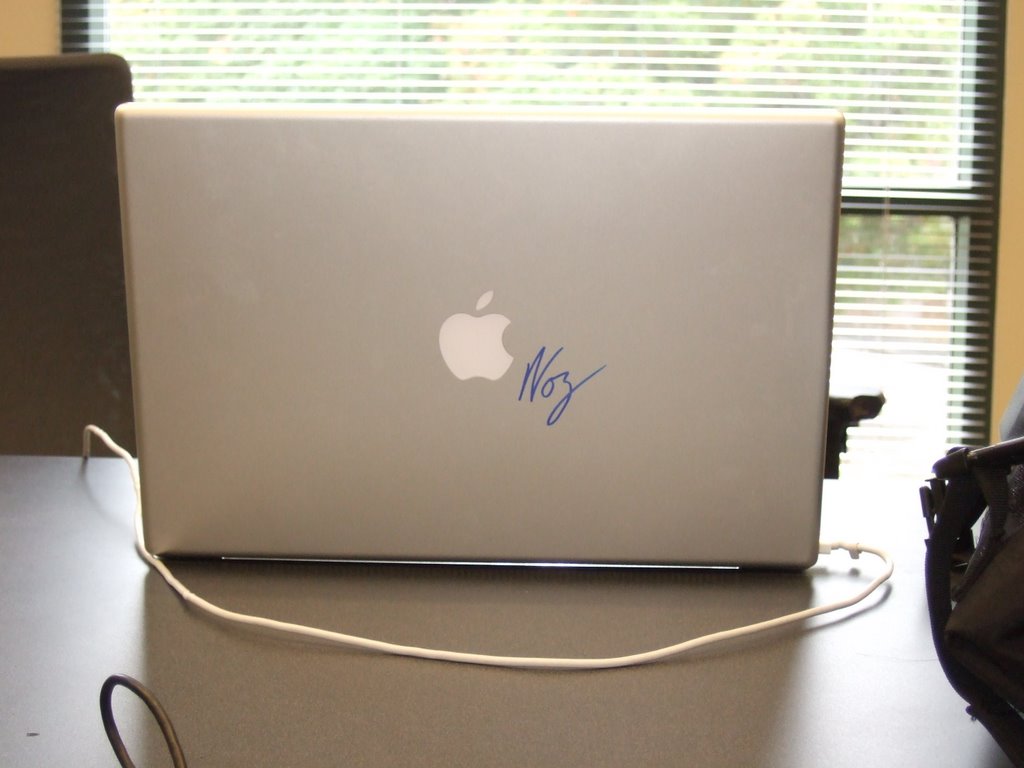
I got my laptop signed by Steve Wozniak! The space on the left is reserved for Steve Jobs.
Monday, April 24, 2006
OS X Fast OS Switching
I usually use all three major operating systems: Windows, OS X, and Linux. Now, I can use them on the same computer, at the same time.
http://www.youtube.com/watch?v=Dbt9upE6hpM
http://www.youtube.com/watch?v=Dbt9upE6hpM
Friday, April 07, 2006

Friday, February 10, 2006
A Microsoft product that's better on Mac and Linux
I was trying out remote desktop on Linux (command: rdesktop) and it does something that the Windows XP version can't: Widescreen. It take full advantage of my 24" Dell FP2405. It also has options for bitmap caching, sound forewarding, and local printing, among others.
(I'm pretty sure macs use this version of remote desktop too... could be wrong)
Linux is also catching up to the next generation of windowing systems: http://www.freedesktop.org/~davidr/xgl-demo1.xvid.avi
I wonder if Apple's interested in using some of this cool X server technology.
(I'm pretty sure macs use this version of remote desktop too... could be wrong)
Linux is also catching up to the next generation of windowing systems: http://www.freedesktop.org/~davidr/xgl-demo1.xvid.avi
I wonder if Apple's interested in using some of this cool X server technology.
Sunday, January 15, 2006
MacBook Ideas
So, I was thinking about why Apple did not release 12" and 17" Powerbook replacements. I'm beginning to think that, instead of just having different sizes, the unreleased MacBooks could have vastly different functionality.
They could make the 12" a convertible tablet with special features for road warriors.
They could give the 17" a TV tuner, a blu-ray disk drive, and perhaps an HDMI/DVI connection for HDTV, making it the ultimate portable AV studio and DVR.
(Analog TV should be gone by 2009.)
They could make the 12" a convertible tablet with special features for road warriors.
They could give the 17" a TV tuner, a blu-ray disk drive, and perhaps an HDMI/DVI connection for HDTV, making it the ultimate portable AV studio and DVR.
(Analog TV should be gone by 2009.)
Friday, January 13, 2006
Apple
 When I purchased my Powerbook 12" in high school, the only complaint I had was that it was slow.
I guess Apple heard me =)
The new iMac and MacBook Pro are amazing.
If I get the internship, the next thing I'll get will probably be the MacBook Pro.
Edit: My friend told me to wait for Merom... hmmm.
Tuesday, January 10, 2006
AAPL (Apple Computer)
Today, Apple released their first Intel-based computers, the iMac and the MacBook Pro. Coincidentally, their share price closed at $80.86. (The model number of an Intel processor.)
Saturday, December 31, 2005
Linux (Kubuntu) vs Windows XP vs OS X
Format
- Linux
- Windows
- OS X
- It works, most of the time, with most hardware.
- It works, almost all the time, with all supported hardware.
- It works, all the time, on Macs.
- Plasticky, with occasional glitches, but super fast
- Programs that use GTK will have buttons and other controls that look like they came straight out of Windows 3.11
- Many themes available: kde-looks.org
- Nothing to write home about.
- Third party themes are a pain to install.
- It's the gold standard.
- If anything, it may be a bit too much eye candy for some people.
- Awesome attention to detail - Notice how dialog boxes have a glowing button and an outlined one? Pressing space bar activates the outlined one and pressing Enter activates the glowing one.
- Not that good, since most companies don't develop open source software, but nearly everything is free.
- Super Good. It's ubiquitous, so it makes sense that it has the most application support.
- OK. Everything you need is there, except games.
- Easy
- Use apt-get, or copy and paste some command line entries from the package maintainer's site.
- Easier
- Double click the install.exe
- Easiest
- Drag to Applications folder
- Good
- considering it's all free stuff
- Things can be crashy... Perhaps it's because the dynamic libraries they depend on are constantly changing.
- Mostly Crap
- Most of the programs that cost money aren't even as good as their open source counterparts (check out the multitude of CD-burning programs).
- However, there are a small number of very high quality Windows-only apps... It's sort of a "long-tail" distribution.
- Awesome
- Super !!! 111 One One One 0xFFF !!!
- Even dysfunctional apps appear to ooze with quality.
- Passable.
- Most vendors don't provide open source drivers for their products, so people have to make new drivers, which, from my experience, either work flawlessly, or only provide the basics (3 out of 9 mouse buttons isn't too bad).
- Awesome.
- If it doesn't work on Windows, it probably won't sell that well...
- Slick, as long as it's supported hardware. Otherwise, you're screwed.
- Normally, when you install new hardware, you expect to configure it and step through some sort of install process On the Mac, you just plug it in and it automagically knows how you wanted it set up, (most of the time). So you can just use it.
- I've been running without Antivirus for a few days and I haven't noticed any strange events. However, a good virus would hide its presence until called upon to perform its duty. I wonder how I would detect a virus before it's too late...
- Not having both antivirus and antispyware scanning is blasphemy.
- No antivirus, no antispyware, no problem. Again, I wouldn't know how to detect a virus if it somehow infected the system. Oh well.
- There are a lot of distros. Fortunately, I chose Kubuntu, which is (allegedly) a very user-friendly distro with a large following. Therefore, getting help was easy.
- Highlight error. Paste it into Google. Instant support.
- Large swaths of Mac users use the same hardware, and the software choices do not vary that much; so, even though the Mac-using population is small, the homogeneity of hardware and software configurations guarantees a sizeable support group.
- Plus, there are sites like MacRumors and ThinkSecret that host forums that serve as secondary support groups.
- Inspires one to hack.
- since everything comes with source
- Inspires one to try other OS's.
- since it's old and crufty
- Inspires one to create good-looking things.
- since it's elegant
Tuesday, December 13, 2005
Mac Tablet
I was talking to a friend the other day who happens to be a Tablet PC user, and he said he just bought to PC tablet to tide him over until the Apple Tablet release.
Encouraging words...
Encouraging words...
Thursday, August 11, 2005
My ideas aren't lame?
A few years ago, I tried to sell my dad on the idea of having a scroll ball on top of a mouse, but he just laughed at me and said getting a patent isn't easy. He went on to show me the USPTO.gov website and said I would have to read every patent containing the word "scroll" and "mouse" and study them for prior art. I read about two pages of patents (about 100) and gave up. I pitched my idea to a few people I met at school, but even though some poeple thought it was interesting, most said it had no application and that the vertical scroll wheel was a better suited for scrolling in the only direction that mattered.
Well, now I can say, "I told you so."
(I now keep all my patent ideas in a text file on my desktop.)
Well, now I can say, "I told you so."
(I now keep all my patent ideas in a text file on my desktop.)
Subscribe to:
Posts (Atom)